
From Domain Name to IP Address: How DNS Works
When you type a domain name such as example.com into your browser, your computer needs to find the network address associated with that name. DNS, or the Domain Name System, handles this process by helping translate human-readable domain names into DNS records such as IP addresses.
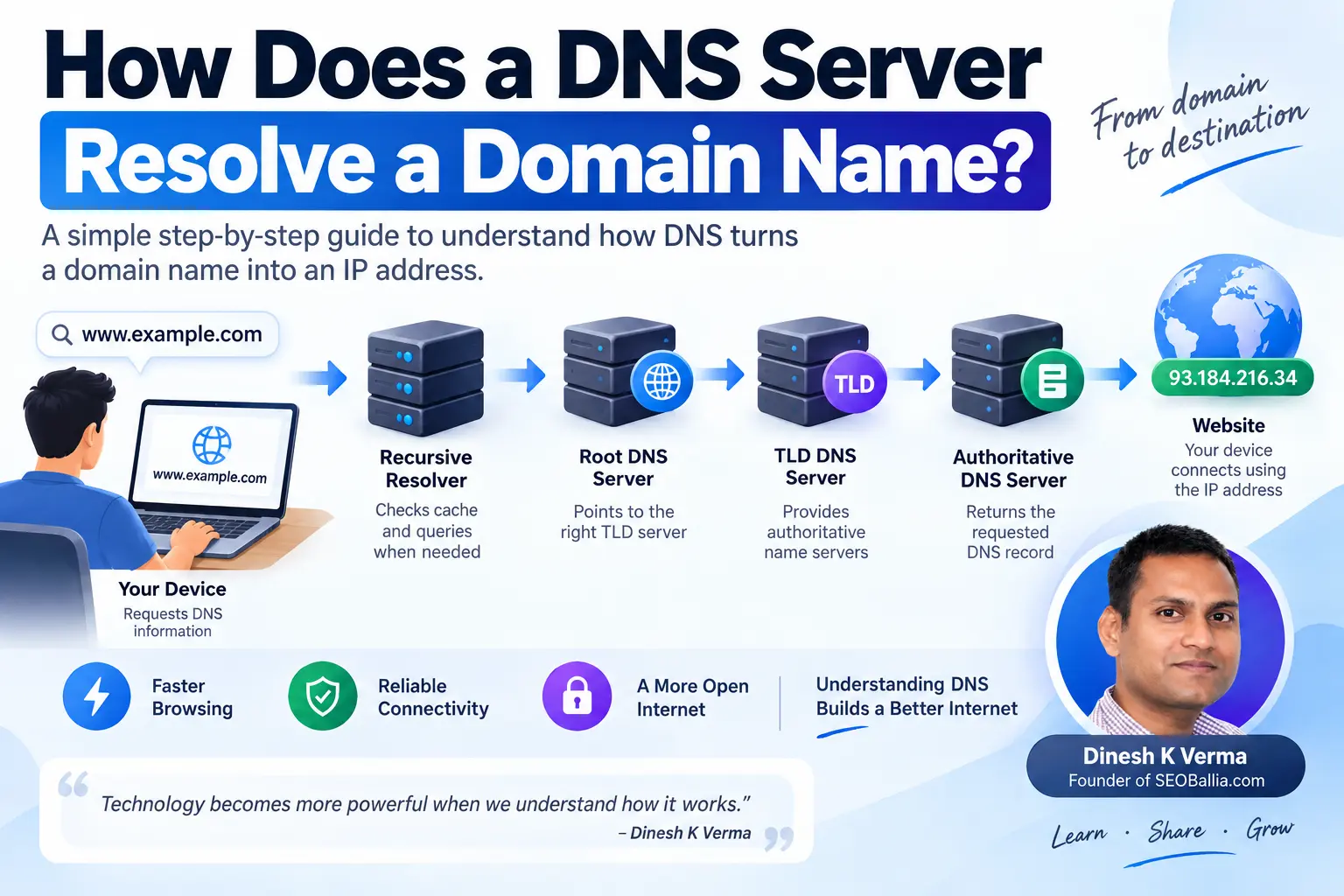
A DNS lookup usually begins when your device asks a recursive DNS resolver for information about a domain. If the resolver does not already have the answer in its cache, it can query the DNS hierarchy, including root DNS servers, the appropriate top-level domain server, and the domain's authoritative DNS server. The authoritative server provides the requested DNS record, which the resolver then returns to your device.
The process sounds complicated at first, but the basic idea is straightforward. You enter a name that is easy for humans to remember, DNS finds the corresponding information, and your device uses that information to continue communicating with the destination.
Domain Name
You enter a human-readable hostname such as example.com.
DNS Lookup
A resolver looks for the DNS record associated with that hostname.
Network Address
The DNS result gives the client information it can use to reach the destination.
What Is DNS?
DNS stands for Domain Name System. It is a distributed naming system used on the Internet to store and retrieve information associated with domain names.
One of its most familiar jobs is helping map a hostname to an IP address. Computers communicate across networks using addresses, while people generally prefer memorable names.
For example, remembering example.com is much easier than remembering a numeric IPv4 address. DNS provides the system that allows the domain name to be resolved into the information needed by the client.
The DNS Resolution Process at a Glance
A typical DNS lookup can involve several different components. However, caching often means that not every component has to be contacted for every request.
How Does a DNS Server Resolve a Domain Name?
The easiest way to understand DNS resolution is to follow a domain lookup from the moment you enter a hostname into your browser.
You enter a domain name
Suppose you enter example.com into your browser. The browser needs to know where that hostname should connect before it can communicate with the destination.
Your device checks local information
Before relying on an external DNS resolver, the operating system and other local components may already have DNS information available through caching. A local hosts file can also influence hostname resolution.
Your device sends a DNS query to a resolver
If the required information is not available locally, the DNS query is normally sent to a configured DNS resolver. This resolver may be provided by an Internet service provider, network administrator, or another DNS service.
The recursive resolver checks its cache
The resolver first checks whether it already has a usable answer. If the requested DNS information is cached and has not expired, the resolver may return the cached result without performing a complete lookup.
The resolver queries the DNS hierarchy
If the resolver does not have the required answer, it can query DNS infrastructure to determine where authoritative information for the domain can be found.
The authoritative server provides the record
The authoritative DNS server responsible for the domain or zone can provide the requested record. For a typical website lookup, that may be an A record containing an IPv4 address or an AAAA record containing an IPv6 address.
The resolver sends the answer back
The recursive resolver returns the DNS response to the requesting device. The device can then use the resulting information as part of connecting to the destination.
What Is a Recursive DNS Resolver?
A recursive DNS resolver is a DNS server that handles DNS queries on behalf of clients and performs the additional lookup work needed to obtain an answer.
Your computer normally does not need to communicate individually with root DNS servers, TLD DNS servers, and authoritative servers. Instead, it can ask a recursive resolver to find the answer.
If the resolver already knows the answer from its cache, it can respond immediately. Otherwise, it can perform the necessary DNS queries and then return the result to the client.
What Happens at the Root DNS Level?
The DNS root is at the top of the public DNS hierarchy. Root DNS infrastructure helps resolvers determine where they should look for information about a particular top-level domain.
For example, if a resolver needs information about example.com, the root level can direct the resolver toward the DNS infrastructure responsible for the .com top-level domain.
The root does not normally provide the final IP address for the website. Instead, it provides information that helps the resolver move further down the DNS hierarchy.
What Is a TLD DNS Server?
TLD stands for Top-Level Domain. Examples include .com, .org, and .net.
TLD DNS infrastructure contains information that helps resolvers find the authoritative name servers responsible for individual domains within that TLD.
Using example.com as a simplified example, the resolver can first reach the .com TLD infrastructure and learn which authoritative name servers should be contacted for example.com.
What Is an Authoritative DNS Server?
An authoritative DNS server is responsible for providing authoritative DNS information for a particular DNS zone.
When a recursive resolver reaches the appropriate authoritative server, it can request the record it needs.
For a website hostname, this could be an A record or AAAA record. Other DNS record types provide different kinds of information.
| DNS Component | Primary Role | Typical Result |
|---|---|---|
| Local cache | Stores DNS information that may be reused. | Can provide a cached result locally. |
| Recursive resolver | Finds DNS answers for clients. | Returns the requested DNS response. |
| Root DNS | Directs the resolver toward the appropriate TLD. | Referral information for the TLD. |
| TLD DNS | Helps locate authoritative name servers. | Referral information for the domain's authoritative servers. |
| Authoritative DNS | Provides authoritative records for a domain or zone. | The requested DNS record. |
A Real DNS Resolution Example
Let's walk through a simplified example. Imagine that you enter www.example.com into your browser and none of the required information is currently cached.
The browser needs DNS information
The hostname is available, but the client needs DNS information associated with that hostname.
The operating system checks available information
Local DNS caches and other local resolution mechanisms may be checked before a request is sent to the configured resolver.
The recursive resolver receives the query
The resolver checks whether it already has a valid cached answer for the requested hostname.
The resolver contacts DNS hierarchy servers if necessary
If it needs more information, the resolver can query root DNS infrastructure and follow referrals toward the appropriate TLD and authoritative DNS servers.
The authoritative server answers
The authoritative server returns the requested DNS record for the hostname.
The resolver returns the response
The recursive resolver sends the DNS answer back to the client, which can then continue the connection process.
What Is DNS Caching?
DNS caching is one of the most important parts of making DNS resolution efficient.
DNS information can be cached by different components, including the operating system, applications, local network infrastructure, and recursive DNS resolvers.
If a resolver already has a valid cached answer, it does not necessarily need to repeat the entire DNS lookup process.
What Is DNS TTL?
TTL stands for Time to Live. In DNS, the TTL specifies how long a DNS record can generally remain cached before it should be refreshed.
Suppose a DNS record has a TTL of 3,600 seconds. A caching resolver can generally use that record for the specified period before it needs to obtain fresh information.
TTL is one reason DNS changes can take time to become visible everywhere. Different DNS resolvers may have cached an older record at different times.
What Are A and AAAA Records?
When people talk about DNS resolving a domain to an IP address, they are often referring to A and AAAA records.
| Record | Purpose | Address Type |
|---|---|---|
| A | Maps a hostname to an IPv4 address. | IPv4 |
| AAAA | Maps a hostname to an IPv6 address. | IPv6 |
A domain can have multiple address records. It can also have different DNS records for different hostnames within the same domain.
DNS Resolution Is Not the Same as Loading a Website
DNS resolution is only one part of the process involved in loading a website.
DNS helps the client discover the network information associated with a hostname. After that, the browser can establish the appropriate network connection and communicate with the destination using protocols such as HTTP or HTTPS.
DNS
Resolves the hostname and provides relevant DNS information.
Network Connection
The client establishes the appropriate connection to the destination.
Web Request
The browser communicates with the website using the appropriate application protocol.
This distinction is useful when troubleshooting a website. A DNS problem can prevent a hostname from being resolved, while a website can also be unavailable even when DNS resolution is working correctly.
What Happens When DNS Cannot Resolve a Domain?
DNS does not always return an IP address. If the requested information cannot be obtained, the resolver can return a DNS error.
One well-known response is NXDOMAIN. It indicates that the requested domain name does not exist according to the relevant DNS authority.
Other DNS response codes can indicate different conditions, including problems communicating with DNS servers or other resolution failures.
Can You Test DNS Resolution Yourself?
Yes. DNS lookup tools can help you inspect how a hostname resolves and which records are returned.
Two commonly available command-line tools are nslookup and dig.
The exact output depends on your operating system, the DNS resolver you are using, the record type requested, and the DNS configuration of the domain.
Common DNS Terms You Should Know
| Term | What It Means |
|---|---|
| DNS | Domain Name System, the distributed naming system used to store and retrieve DNS information. |
| DNS resolver | A server that handles DNS queries and obtains DNS answers. |
| Recursive resolver | A resolver that performs additional DNS queries when it does not already have the answer. |
| Root DNS | The top level of the DNS hierarchy, which helps direct queries toward TLD infrastructure. |
| TLD | Top-Level Domain, such as .com, .org, or .net. |
| Authoritative DNS | DNS infrastructure responsible for authoritative information about a DNS zone. |
| DNS cache | Previously obtained DNS information stored for reuse. |
| TTL | The time associated with caching a DNS record. |
| A record | Maps a hostname to an IPv4 address. |
| AAAA record | Maps a hostname to an IPv6 address. |
Frequently Asked Questions About DNS Resolution
What does DNS resolution mean?
DNS resolution is the process of finding DNS information associated with a domain name or hostname. For a typical website request, this can include finding an IP address that the client can use to connect to the destination.
How does DNS find the IP address of a domain?
A recursive DNS resolver checks its cache first. If it does not have a valid answer, it can query the DNS hierarchy and ultimately contact the authoritative DNS server for the domain to obtain the requested record.
Does my computer contact the root DNS server directly?
Normally, no. Your device typically sends the DNS query to a configured recursive resolver. The resolver performs additional queries through the DNS hierarchy when necessary.
What does a recursive DNS resolver do?
A recursive DNS resolver handles DNS requests for clients. It can use cached information or perform additional DNS queries to find the requested answer.
What does an authoritative DNS server do?
An authoritative DNS server provides authoritative DNS records for a domain or DNS zone. A recursive resolver can query it when it needs information that is not already cached.
Why is DNS caching important?
DNS caching allows previously obtained DNS information to be reused for a period of time. This can reduce repeated DNS queries and make the resolution process more efficient.
What is the difference between an A and AAAA record?
An A record provides an IPv4 address, while an AAAA record provides an IPv6 address.
What is DNS TTL?
TTL, or Time to Live, specifies how long DNS information can generally remain cached before it should be refreshed.
What happens if DNS cannot resolve a domain?
The DNS resolver can return an error instead of an address. One possible response is NXDOMAIN, which indicates that the requested domain name does not exist according to the relevant DNS authority.
How can I check DNS records for a domain?
Tools such as nslookup and dig can be used to query DNS records. The available commands and output vary depending on the operating system and DNS configuration.
Final Takeaway
DNS resolution is the process that helps turn a human-readable domain name into DNS information that a computer can use.
In a simplified lookup, your device sends a request to a recursive DNS resolver. The resolver checks its cache and, if necessary, works through the DNS hierarchy. Root DNS infrastructure helps identify the appropriate TLD, TLD infrastructure helps identify the authoritative name servers, and the authoritative server provides the requested DNS record.
Caching makes this system much faster and more efficient. That is why a DNS lookup often happens without you noticing anything at all.
Once the necessary DNS information is available, the browser can continue with the network connection and request the website.
DNS Is More Than Just an IP Lookup
The next time you enter a domain name into your browser, remember that several pieces of Internet infrastructure may work together behind the scenes before your browser even begins communicating with the website.
Understanding DNS makes it much easier to troubleshoot common problems involving domains, hosting, website migrations, DNS changes, and connectivity.
DNS behavior can vary depending on the operating system, browser, network configuration, resolver, caching, and DNS records configured for the domain. The process described above is a simplified explanation of typical DNS resolution.